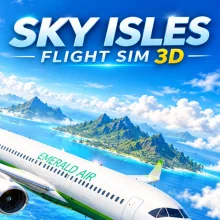
Sky Isles Flight SIM 3D is a flight simulator where you progress from a training plane to larger aircraft while flying between tropical islands. Complete 17 career missions, accept charter jobs, or explore the 15-island world in Free Roam. Passenger flights require you to navigate using the map and flight plan, while charter jobs can bring emergencies that force you to divert to another airport. Every landing receives a grade, with your best result saved at each destination. Choose an aircraft and prepare for takeoff.
Landing is one of the most important parts of the game. Each touchdown receives a grade from S to D based on four factors:
- Sink Rate: How smoothly your aircraft descends.
- Centreline: How accurately you align with the runway.
- Touchdown Zone: Whether you land in the correct area.
- Attitude: How well you control the aircraft during touchdown.
How to Play Sky Isles Flight SIM 3D
- Start with the training aircraft and learn the flight controls.
- Increase throttle, accelerate along the runway, and take off.
- Follow mission objectives or use the map to navigate between airports.
- Manage your speed and altitude, then lower the landing gear before touchdown.
- Align with the runway and descend smoothly to improve your landing grade.
Features
- Six aircraft include a trainer, aerobatic plane, twin-turboprop air ambulance, cargo freighter, sport jet, and passenger airliner.
- Career Mode contains 17 missions with ring courses, races, cargo drops, air ambulance rescues, and passenger flights.
- Endless charter jobs can introduce engine failures, bird strikes, and medical emergencies.
- Free Roam lets you explore 15 tropical islands.
- Find 24 hidden Golden Wings and complete 19 achievements.
- Progression increases pilot rank and unlocks aircraft and paint schemes.
- Landing grades range from S to D, with personal bests saved for each airport.
- Daytime, sunset, and nighttime settings include runway and approach lighting.
- Map, radar, and minimap tools support navigation.
Controls
PC:
- W / S: Increase or decrease throttle
- Arrow Keys / A / D: Control pitch and roll
- Q / E: Rudder and ground steering
- B: Brake
- G: Toggle landing gear
- Space: Drop cargo
- T: Activate smoke trail
- C: Change camera
- M: Open map
- P / Tab: Pause
Mobile:
- On-screen touch controls: Operate the aircraft
Is Sky Isles Flight SIM 3D free to play?
You can play Sky Isles Flight SIM 3D for free on MEEGames.
Can I play Sky Isles Flight SIM 3D on mobile devices and desktop?
Sky Isles Flight SIM 3D can be played on your computer and mobile devices like phones and tablets.
Does Sky Isles Flight SIM 3D require a download?
No download is required! You can play Sky Isles Flight SIM 3D directly in your browser on MEEGames. Just open the game page and start playing instantly.
How are landings graded?
Grades consider sink rate, runway centreline alignment, touchdown location, and aircraft attitude. Your best grade is recorded separately for each airport.
Online game Sky Isles Flight SIM 3D belongs to such genres as 3d game, simulation, adventure in touchscreen, desktop, mobile, tablet, browser. Sky Isles Flight SIM 3D has been played 78 times.